Friday, January 25, 2008

"That's The Way We've Always Done It." & Schools

Ian Jukes of edtechnot.com has an excellent, easy-to-understand article explaining why school reform is so necessary and so difficult:
http://www.edtechnot.com/notarticle103.html

Ian Jukes article - 1/03 via kwout

I recommend the whole article, especially if you disagree with it - http://www.edtechnot.com/notarticle103.html - because the snippit I've supplied doesn't include the logic.

Via Experiencing E-Learning - http://christytucker.wordpress.com/2008/01/24/daily-bookmarks-01242008/ - final link.

Tuesday, January 22, 2008

Newpapers and the Web - Influences

I'm finding it fascinating watching how the web is influencing the look and structure of newspapers. By the 1940s, magazines with their frequent images had begun influencing newspapers, as pictures became frequent, especially on the front page.
http://i19.ebayimg.com/04/i/000/77/ea/f0d7_1_b.JPG

f0d7_1_b.JPG (JPEG Image, 400x300 pixels) via kwout

Readers read by glancing at various headlines and choosing articles, and often reading only a bit before moving on to another, or back to a previously started one. In some ways, the layout of these midcentury newspapers predated the glancing way people currently read web pages, as seen in this reading map of webpages:

http://www.useit.com/alertbox/reading_pattern.html

F-Shaped Pattern For Reading Web Content (Jakob Nielsen's Alertbox) via kwout

spapers appeared to be more influenced by the layout of magazines than by the web.

http://content.answers.com/main/content/wp/en/thumb/1/17/250px-Liberal_Landslide,_Globe_and_Mail_cover.jpg

250px-Liberal_Landslide,_Globe_and_Mail_cover.jpg (JPEG Image, 250x405 pixels) via kwout

However over the past year I've seen changes that I attribute directly to the influence of the web. While many people I know would think that I was making a negative and critical statement about the changes in newspapers, I am not. I see these changes as intelligent awareness of the impact of the web on how we read. I also see them as making newpapers both more attractive too, and more likely to be read by, the digital generation, a real positive.

The first change I noticed had to do with the numbering of the newspaper sections in the Toronto Star. All my adult newspaper-reading life, the sections had been numbered by using the letters of the alphabet. I knew where to find the comics because I could find the section labelled 'F' right after the section labelled 'E' and before 'G'. I was used to that. Alphabetical indexing was a well-established structure (which developed as a result of the invention of printing, but that another story.) Then some time ago, something called "tagging" was invented for the web, because linking is part of how the web works. This resulted in people expecting a "label" that was also a "keyword".

When the Toronto Star switched from alphabetical labelling to a kind of tagging of its sections, I didn't notice at first. The logic of labelling the Sports section 'S', and the Life section 'L' made immediate sense to me, and I'm sure to almost everybody. The first section remained 'A' and the, usually second, World section became the variation 'AA', but the Business section was 'B' even though it was rarely, if ever, second. Perhaps not verybody sees this change as influenced by the web, but I do.

I challenge anyone to deny the influence of the web in the way today's front page is laid out.

http://www.thestar.com/0122082359/utilities/todayPaper

TheStar.com - Today's Paper via kwout

Pictures catch the eye first, and the text is there to support the information in the pictures, just as on well-designed web pages. Then it's almost as though headings were hyperlinks, that you could click on (read below) for more information. The information is conveyed initially by the graphics, and the text is augmented further by graphics.

Our culture is becoming more visual in the representation of information, and was even before the net. The increasing use of photos as part of newspapers and magazines grew steadily during the 20th Century, and was indirectly augmented by movie and tv. We like visually conveyed information and attractive graphic design, and the smart communicators know that. And, the side of the newspaper and web connection I haven't mentioned, the fact that I collected all my images from the web and are publishing them on the web, even though what I'm observing is newspapers!

Also posted at http://eduspaces.net/vinall/weblog

Thursday, January 17, 2008

Fun, fun, fun!


Through Jane Hart's Jane's E-Learning Pick of the Day, http://janeknight.typepad.com/pick/2008/01/waholizer.html here's me, as seen through the Warholizer Give it a try;->

Wednesday, January 16, 2008

Has the Computer and the Web Changed Writing?

I was at a session for writing instructors today; we were discussing whether we could actually teach students how to edit their writing. As we talked about our various approaches, I remembered the room I boarded in my last year as an undergrad. I remembered how small it was and how the roof sloped over the bed so I had to be careful sitting up or I could bang my head. I remembered the really small table and how I did my editing on the floor, on the throw rug, usually after midnight before the day of the class it was due.

I would have books from my university library or the local one piled on my bed. I would have recipe cards with the names of the books I was quoting from and/or using in my bibliography in a pile to the side. I would have another pile of cards with useful quotes copied out onto them fanned out in front of me on the rug I was kneeling on. Lots of blank pages and scotch tape would be in front of me too, and my rough draft on my knees as I cut it into stripes so I could restructure it. I would lay out the stripes of paper and the cards with my quotes in the order I thought would 'work', then I would read through the collection and rearrange it a few times, before finalizing. I would write out new bits in between and then tape the stripes or cards that fit in next on the page. I would end up with several very messy, floppy pages, carefully numbered so I wouldn't get the order confused.

Then I would move to the small table that served as my desk, get some fresh paper, and begin copying out my essay by hand, on every other line. I hated doing the bibliography; I could never remember where the periods, commas and semi-colons went, and I couldn't believe it was all that important. And I knew I was a poor speller but often defiently refused to look up words. (At 3:00 a.m. I often felt defiant.) I used White Out too often, and did the covering page last, often as the sun was rising. Then I had breakfast and staggered through the day until whenever class was, when I handed in my essay in person, as required. Then I crashed!

I suspect some of today's students have a somewhat similar pattern in terms of timing. But let's look at some of the details of their process. Today almost all students will have, or have access to, a computer, and their rough draft will be written using a word processor. They will also use the computer for research, using the web to access web sites, some available on the open web, but also some found using Google Scholar or other academic search engines. Some will use Google Scholar as a portal into their university's online resources and journals, if their university has added their library to the Google network, and if the students have their student number and the password. Some will order books, using the deep selection available online through sites like Amazon and Indigo rather than local bookstores. Some will have books from the library, but chances are they will use the web to check and see if the book was available and perhaps to put a hold on it.

Some students will be using their del.icio.us account or some other social bookmarking application to collect their online resources and tag them with helpful labels, including, perhaps, the name of the course or the essay topic. Some of the more (web 2.0) sophisticated students may be using the research tool, Zotero, a free Firefox extension.
Even if they find Zotero too web bound for their taste, they will be writing up their notes and drafts using a word processor. Copying and re-copying text writing by hand or by typing is just too onerous. They will copy & paste, not kneeling on the floor using scissors, paper, recipe cards and scotch tape, but by using keystrokes or clicking on menus. They won't be getting defiant about their spelling, they will just right click on the words underlined in red, and then click on the correct (we hope) word to replace it. They need to learn new skills with this new tool, like making sure that the word they chose is, indeed, the word they mean. And they will have to be taught to double-check what happened when they copied & pasted. It's way too easy to leave a word dangling or the wrong form of the verb sitting there after the copy & paste, (especially at 3:00 a.m.!)

When they get close to the final draft, today's students should be pushed to print their work up, read it out loud looking for typos, and doing a final proof-reading to make corrections. When they have made the corrections, they need to make sure they have the font specified by the professor, and the line-spacing. There are more things to check for in word-processing, even though it looks neater and, therefore, deceptively as if it is correct.

The title page can be done minimally, or almost graphically designed, if the student is sophisticated enough to understand that it will likely influence the prof's attitude toward the paper even before he or she reads it. And what about the bibliography? Even if today's students haven't taken the time to use Zotero's many tutorials to learn how to use it to cite, there are ways to make creating a Works Cited or Bibliography section that are much easier than I had it back in the pre-web days.

BibMe is one of the many web-based automatic bibliography-makers that makes this final stage much easier.
Getting to class and turning the essay in isn't the same either. Some profs, sometimes, accept the essay by email, which means that s soon as today's student attaches the final file and hits "Send", it's bedtime!

In the years since I was a student the phenomenological aspect of writing an essay has changed phenomenologically! Do those assigning and/or teaching writing understand that and help the students cope with these differences?

Tuesday, January 15, 2008

del.icio.us - Effective Social Bookmarking

One of my favorite aspects of the web is the ability to link to other sites. My favorite part of being able to link to other sites is the capacity to store, organize, and re-find those sites using tagging, and social bookmarking. (If you aren't familiar with these terms and actions, I've linked backup information at the bottom of this post.)

As part of collecting and organizing links, I'm always watching for links I can learn from, and share so others can learn from them to (and to avoid unnecessary reinventions of already well-made wheels.)

In that vein, I offer this link from Lifehack.org
- http://www.lifehack.org/articles/technology/top-10-ways-to-use-delicious.html

Wikipedia
WebToolsForLearners

Thursday, January 10, 2008

Knowledge and Learning - Graham Attwell

I find Graham Attwell's (research-based) thoughts on how learning occurs now fascinating.
SlideShare | View | Upload your own

What do you think?

Wednesday, January 09, 2008

Skitch - An Easy Tool for Pictures - Macs Only

Skitch Beta, a Mac application, is free and a lot of fun. It's almost worth buying a Mac just to get a copy;-> I've been using it to add pictures to my edublog - here and here. It works well with Flickr, my photos, and screenshots. Unfortunately, it isn't available for PCs yet.

You can see the screenshots that I simply dragged onto Skitch, which made them .jpgs, and the two places I could either click to drag the image onto the desktop or another page, or with two clicks get a Skitch webpage opened - and simply click to copy and paste it into the post using Blogger's image icon
To learn more - go here - http://skitch.com/ - and request your own version - if you are on a Mac.

Tuesday, January 01, 2008

Using Styles for Academic Papers, & Zotero for Research

Writing essays, papers, dissertations and other academic pieces is (or should be) radically changed by two tools:

  1. the Styles tool in word-processing;
  2. Zotero, the Firefox researching tool.

Teachers who have your students research and write, take note: your students need to learn how to use these tools, consequently so do you;-> There's an article on the Next Generation of Bibliographic Manager in the latest issue of Innovate, a journal of online education. You can register for free and get an email notifying you whenever a new issue and the related podcasts are available. I recommend it, especially if you plan on getting further education yourself. (Most of the links to tutorials below come from the article on the bibliographic manager, Zotero.)

The Styles Tool

The name of this tool confused me for a long time and I initially avoided it. Luckily, one of my students took the time to explain it to me, and I immediately set out to lean how to use it because I could see how time-saving it would be. Here is a brief explanation of what Styles is and why it's so useful: http://spot.colorado.edu/~baileysm/tutorials/Word_Styles_Demo.htm Although this demo is based on MSWord, a version of Styles can be found on the free office software, NeoOffice, and on the Mac iWorks word-processor, Pages.

Just the automatically generated and clickable updating of a Table of Contents is worth the time it takes to learn how to use Styles. Not to mention the fact that it is simply part of a professional writer's skillset.

Managing Research and Creating a Bibliography

You can get a sense of why Zotero is so important and useful by checking out this Zotero Quick Start Guide, especially the two brief videos.

While I recommend getting students using Zotero ASAP, some easier bibliographic tools, without the research component, are the following:

  1. http://www.easybib.com/
  2. http://www.bibme.org/
So get ready for writing your own academic pieces and helping your students write theirs by learning about these tools and practising using them.

Cross published at http://www.commun-it.org/community/vinall/weblog/663.html

Thursday, December 27, 2007

Tagging - For Organizing Information

One of the most important aspects of the web today is a way of organizing information called tagging (or, on Blogger, labelling). You could say that tagging is the child of alphabetical indexing - a post-Gutenberg information management invention - and hyperlinking - a web networking development. You can see what this looks like in the tag cloud pictured below.
http://en.wikipedia.org/wiki/Tag_%28metadata%29 (If you want to learn about Web 2.0, you can click on the link to Wikipedia and then click on the various hyperlinked terms in the image to read the Wikipedia definitions. The size indicates how often each is used.)

A Very Small History Lesson
Humans spoke before we wrote and for centuries we dealt with information by remembering, sometimes using memory aids like rhyme, rhythm, and formulaic storytelling. Then writing developed, and people could note down information, and compose stories. Sacred writings passed wisdom along the generational chain, with "books" being tied together into one unit, no matter what their subject matter. A small elite of those who could read and write formed, and were usually part of a priesthood devoted to preserving, accumulating, and passing along the wisdom. All the "books" were hand-copied and some priests had books virtually memorized, but that didn't create the absolute uniformity that came with the printed word.
from - http://etc.usf.edu/clipart/4200/4255/printing-press_1.htm

When the printing press was invented, exact copies could be made, and human interventions, mistakes and alterations didn't cause variations among copies. Reading, in the European world was still associated with the sacred, although universal literacy was seen as a way to allow everyone to have immediate connection with the Holy Scriptures rather than having to go through a hierarchy of priests. With the growth of universal literacy, many other developments followed, including the ability to "read" (and interpret) the same texts differently, which created dissent. People began to reproduce books other than scriptures, and thus to share and spread philosophical and scientific thought, which sped up "progress" and led to even more differing opinions.

For scholars and readers, other developments were built on the uniformity of the books being published using a printing press. In order to avoid reading a whole book while looking for one piece of information, the organizational development that most links (pun intended) to tagging was developed.


While information and ideas were being discovered, collected, and published, readers began to want to read just parts of (non-narrative) books. Now that many people could read books where the pages always stayed the same, it became easier to manage information. Scholars started creating categories, or taxonomies, so they could find specific information quickly and completely. They began using indexes at the ends of books, and alphabetizing these indexes; it was worth the time it took for someone to index the information in a book to make it more accessible to the many readers of the book.

It quickly became essential for any learner to learn how to use indexes in books and in libraries, and systems of organizing information developed as rigid categories were set up, and people learned how to use them.

With the arrival of the World Wide Web came the possibilities of hyperlinking. Taxonomies & alphabetical indexing (top down hierarchically controlled) plus hyperlinking (giving choice in reading/viewing paths)combined and in Web 2.0 tagging was born.

I use tagging for my blog posts, to make it easier for readers to search for the topics that interest them. However, the real power of tagging, for me, comes with my online bookmarks. I use del.icio.us - to collect website addresses, URLs, for future reference. I use words or phrases that have meaning for me as keywords. Sometimes when I'm adding a site to my del.icio.us account, a tag may be a general topic, like, say, "social_bookmarking" or it might be highly idiosyncratic, like the course code of a course I teach, or I might add both plus the name of a friend whom I'll send the link to next week, or all of them. For example,


While I check through the blogs I follow, using my feed reader, I don't read them in full, but I do add the relevant ones to my del.icio.us account, and now have an extensive collection of tags -

far more than I can show you in a screen shot. They are an invaluable resource, and they are named for my interests and needs, not according to a rigid and prescribed set of terms.

Tagging is a new and highly useful way to organize information, a method that didn't exist, before the web.

Wednesday, December 26, 2007

Understanding PLEs and Learning

Through Stephen Downes' OLDaily I encountered What the Heck is a PLE and Why Would I Want One?. It is aimed at teachers, but students and parents would find its brief, clear explanation of the differences between Course Management Systems (CMS) and Personal Learning Exvironments (VLE) helpful.


Have your sound up when you check it out.

Thursday, December 20, 2007

How Lucky Do You Feel About the Environment?


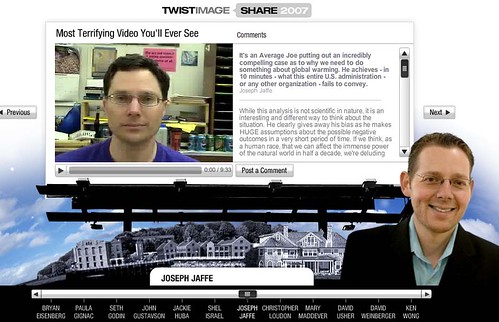
Through Twitter, (and sorry but I can't remember whose blog), I discovered an interesting and diverse collection of 2007 videos - one is essential to watch. Our lives depend on it, - - - and it can be used in schools to teach critical thinking. Here is the link: http://www.twistimage.com/share2007/#/Joseph-Jaffe/


I urge you to watch it and share it!

Monday, December 17, 2007

Canadian Copyright - Educate Yourself!

From Michael Geist's Blog - http://www.michaelgeist.ca/content/view/2431/125/ - how to take action - and power!

The Good and the Bad News About Teaching Writing

Now that I am no longer buried in teaching and marking, I can begin to read (and learn) from my favorite blogs again. Here, through a link from my favorite information disseminater, Stephen Downes, is a clear honest evaluation about the state of writing, and teaching writing, and why this is important in the overall scheme of things, by Michael Umphrey. Please read it!
How to Improve the Teaching of Writing/

Thursday, November 22, 2007

A Novel at 14


For about a year and a half I've been working with a very bright young woman, now 14 years old. I am pleased and proud to announce that she has recently published her first novel, Amelie of the Mitesen. It is a coming-of-age story set in a fantasy world somewhat similar to that of the Metis.

I did none of the writing; I simply told her what I thought was well written, and where she needed to add more of a set-up to parts of the story. It is all her ideas and all her words.

Feel free to order a copy from Lulu.com - http://www.lulu.com/content/1151511

Saturday, November 17, 2007

In My Study

Shadows
What the sun says in passing ...

Past Prime
The remains of beauty.

Sunday, November 04, 2007

Hacking Mail Accounts

I heard a disturbing story today from a friend. She has a Yahoo mail account, or rather, she had one. Someone hacked into it and sent emails to everyone in her contacts list. I can't remember if she said all her files were destroyed as well; we were both rushing in different directions.

All her contacts got an email starting "Hello Dear" which her kids immediately recognized as a fraud because she never uses that kind of phrase. The email continued, telling her contacts that she was stranded in Africa, and where they could send the money she needed to get back home.

I don't want to increase anyone's paranoia, but that level of fraud is pretty scary. My friend is a smart lady, and she took action immediately, but it has caused her a lot of trouble and anxiety. I don't know what would allow that kind of security breech. Does anybody know how to avoid that kind of hacking?

Wednesday, October 31, 2007

Urban Architecture - Reflecting Contrast


Lately I keep 'seeing' the contrasts and correspondences of current urban architecture and how it frames itself. Digital cameras entice me to practice seeing what I see.

Friday, October 26, 2007

Zonbu - A Green and Cheap Computer

I was sitting in my exercise Second Cup, a 20 minute walk each way, and leafing through one of the magazines - Forbes, I think, when I came across and article on a new make of computer. I could hardly get my head around the price for Zonbu, a computer.

Just $99.00 - (and currently, it doesn't matter whether that's Canadian or American!) It's a gift price. Even though you have to supply a keyboard and pay $12.95 (or more) a month, it's still remarkably cheap.

I like the set-up, too. I'm a fan of online applications, especially free ones. I already use Firefox and Open Office, and store some of my files online in my G.Space - http://www.getgspace.com/ and in my Box account. I think the plan to use the web is very forward thinking.

This is not an advertisement and I'm not going to give up my Mac for a Zonbu just yet, but this is the future. High storage and high cost applications will be for professionals, and perhaps the first home computer. Second or third computers, and computers for students, will be Zonbu computers, or something like them.

Monday, October 22, 2007

Mac + Kitten - Way Too Cute!

Sometimes even cuteness has a purpose

My apologies if you're offended by cuteness or kittens, or Macs;->

Found through Christopher Sessums