The rate of change in our world in exponential. Through Tony Karrer's blog, - a link to the video below:
Great music and a truly important message!
Monday, February 26, 2007


The Growing Impact of Web 2.0
.jpg)
Alja Sulčič describes the impact of web 2.0 on her daily activities, and suggests some questions arising from the changes the read/write web is bringing.
I'm really amazed at what big part Web 2.0 plays in my life (and I in its life). In just a few years it has entered our lives from different doors and it's growing stronger and more powerful days by day. And for this reason I agree with what Michael Wesch pointed out in his video - we really need to rethink a lot of things. Among these things I think that rethinking ourselves is one of the key points. We are being linked in previously unthinkable ways and our lives are being changed. What kind of changes is that bringing us? Are the changes improving our lives or crippling the social aspect of our analogue real lives as some fear?
The answers to these questions are many - and there should be. For me the most important changes are the feeling of connectedness, the feeling of responsibility, the need to share and the trust systems that the users of Web 2.0 are building among each other (just take for example Wikipedia). These are the changes I find most valuable and that I hope I (and others) will be able to keep and use not just for a better and more useful Web 2.0, but also to build a better future - together, by connecting are ideas and constructing new worlds.
If you want to understand more about how web 2.0 is affecting people, both young and old, I recommend the whole post - http://ialja.blogspot.com/2007/02/living-web-20.html - and the comments.
Image - "Open Clip Art Library/Clip Art." Open Clip Art Library. 24 Feb. 2007
Wednesday, February 21, 2007
eLearning Explained
If you aren't sure what eLearning is currently, and want to have a richer understanding, I recommend Tony Karrer's post on it - What is eLearning 2.0? - http://elearningtech.blogspot.com/2006/02/what-is-elearning-20.html
We are in the midst of the biggest change in communications since the printing press, and it is affecting both the methods of teaching/learning, and the content. We need to learn what we can, and use it when we can.
We are in the midst of the biggest change in communications since the printing press, and it is affecting both the methods of teaching/learning, and the content. We need to learn what we can, and use it when we can.
Monday, February 19, 2007
After the Crash: A Final Accounting
Well, my computer is as back to normal as I can get it. Some stuff was recovered, some was replaced, and some was lost forever.
What was Recovered
Many of my Word files were recovered, Not all; I keep discovering that something I know I had is missing. But, thanks to the service people at Canadian Computer on Speers in Oakville, I have much to be grateful for.
Some Replacements
Lost Forever
Lessons Learned
What I've Added
So I've learned a lot, more about the mechanics of computers, more about the wise use of my computer (did I mention you should backup your files?) and that my computer is my external brain, but that I can rebuild and repair it when accidents happen.
A Dark Note
I was going to add a photo of my computer that I had stored in Flickr, but Flickr appears to be closed down for now. Even online is not a complete safety net. Backup!
What was Recovered
Many of my Word files were recovered, Not all; I keep discovering that something I know I had is missing. But, thanks to the service people at Canadian Computer on Speers in Oakville, I have much to be grateful for.
- most of my applications were recovered, so I have the work set-up I'm used to.
- many of my Word files were recovered but not the files from the course that I worked hardest on. I might be able to salvage some information from the histories of pages in the course wiki, but ...
- my old poetry is gone and I only have some of it in hard copy.
- and there's more that I will discover missing in the future, I suppose.
Some Replacements
- I've downloaded QuickImage again, so I can easily turn my screenshots into jpegs for uploading to Flickr
- I've downloaded Audacity and Lame so I can make MP3s
- I'm going to get my podcasts set up in iTunes again
Lost Forever
- my pictures. Some were in Flickr, but I use that mainly to provide images for my blogs. Many of my personal pictures are gone.
- As I mentioned earlier, much of my older poetry is gone, and much of my carefully collected and built course materials are gone.
- My Address Book and all my email files are gone
Lessons Learned
- Backup, backup, backup!!!
- At least for now, I'm forwarding all my email addresses to my gmail account, so I can store my addresses and the messages I save online.
- Using online services, like del.icio.us for bookmarking and Bloglines for collecting blog urls, is not just social, it's a safety move. What I had online, I still have.
What I've Added
- I now have a 120 GB hard drive, bigger than the one that crashed.
- I now have a 640 MB RAM, much bigger than I used to have.
So I've learned a lot, more about the mechanics of computers, more about the wise use of my computer (did I mention you should backup your files?) and that my computer is my external brain, but that I can rebuild and repair it when accidents happen.
A Dark Note
I was going to add a photo of my computer that I had stored in Flickr, but Flickr appears to be closed down for now. Even online is not a complete safety net. Backup!
Wednesday, February 14, 2007
After the Crash!
Well the people who worked on my crashed Mac iBook G4 returned it to me with most of my programs on it, but with small things missing, like the Spell Checker in Word. Not really such a small thing, as I type quickly and need the backup. There were, however, no documents pictures or other data!
When I went into Finder and found everything empty, I couldn't believe it! I felt shaky. I started to enumerate all that I no longer had - pictures, and poetry, and saved pdf downloads, and all my documents from teaching materials to business records. I was not happy.
I called the people who had replaced my fried drive and I think I sounded quite pathetic as I begged them to see if there wasn't at least some data. They asked if I had back-ups; I confessed to being stupid. They said they'd try again, but it would take a long time. The other option was to send the fried drive to a lab and pay a couple of thousand dollars. I said I'd wait to see what they could do, and not to send it to the lab ('cause no way was I paying $2000.00, even if I had been really, really stupid.)
I ignored documents and data for a couple of days, just doing web work, and re-configuring what I needed to do that. Then, when I was looking for something else, I discovered a cache of backups from 2004. (I'm really bad with organizing material objects - I'm much better at organizing files, - and I will get in the habit of backing them up!)
So I took my 2004 CDs, which I hadn't made, but a technician had made them at the school where I worked when my assignment changed and I'd had to move from an IBM laptop to a Mac. (I wouldn't want you to think I used to be smart; someone else had done it for me.)
By that time, I was grateful to have anything. I dragged the files that were still useful over onto my new hard drive and began to put my external brain together again. And began to face the idea of re-creating work I had already done and lost. (Stupid! Stupid! Stooped!)
Today, I rewrote a consulting report on a website, and I think I actually improved it because I changed the structure and made it problem - suggested solution, problem - suggested solution rather than the more traditional business structure with all the recommendations at the end. This structure will be easier, I think, for the website owner to understand & implement.
Then - a reward for the virtues of acceptance and rewriting - the people with my fried drive called and said they got some of the document files off it. Tomorrow, I find out what has been returned to me. And I promise, promise, promise to back-up daily!
When I went into Finder and found everything empty, I couldn't believe it! I felt shaky. I started to enumerate all that I no longer had - pictures, and poetry, and saved pdf downloads, and all my documents from teaching materials to business records. I was not happy.
I called the people who had replaced my fried drive and I think I sounded quite pathetic as I begged them to see if there wasn't at least some data. They asked if I had back-ups; I confessed to being stupid. They said they'd try again, but it would take a long time. The other option was to send the fried drive to a lab and pay a couple of thousand dollars. I said I'd wait to see what they could do, and not to send it to the lab ('cause no way was I paying $2000.00, even if I had been really, really stupid.)
I ignored documents and data for a couple of days, just doing web work, and re-configuring what I needed to do that. Then, when I was looking for something else, I discovered a cache of backups from 2004. (I'm really bad with organizing material objects - I'm much better at organizing files, - and I will get in the habit of backing them up!)
So I took my 2004 CDs, which I hadn't made, but a technician had made them at the school where I worked when my assignment changed and I'd had to move from an IBM laptop to a Mac. (I wouldn't want you to think I used to be smart; someone else had done it for me.)
By that time, I was grateful to have anything. I dragged the files that were still useful over onto my new hard drive and began to put my external brain together again. And began to face the idea of re-creating work I had already done and lost. (Stupid! Stupid! Stooped!)
Today, I rewrote a consulting report on a website, and I think I actually improved it because I changed the structure and made it problem - suggested solution, problem - suggested solution rather than the more traditional business structure with all the recommendations at the end. This structure will be easier, I think, for the website owner to understand & implement.
Then - a reward for the virtues of acceptance and rewriting - the people with my fried drive called and said they got some of the document files off it. Tomorrow, I find out what has been returned to me. And I promise, promise, promise to back-up daily!
Monday, February 12, 2007
Getting Help with New Media Tools!
Through Stephen Downes and Mark Federman,
new media tools have always been difficult to learn without help!
Link here for an amusing illustration from YouTube
new media tools have always been difficult to learn without help!
Link here for an amusing illustration from YouTube
Wednesday, February 07, 2007
eLearning Technology: K-12 Blogging, Wiki and Social Bookmarking Resources
eLearning Technology: K-12 Blogging, Wiki and Social Bookmarking Resources
I suggest Wikispaces - http://www.wikispaces.com/ - which is free for K - 12, and can be made private so only (class) members can see it. It also has a (WYSIWYG) visual editor that is similar to a 'lite' word-processing application, and therefore very easy.
I also recommend Elgg Spaces - http://elggspaces.com/features.php - &/or Elgg.net - http://elgg.net/ - because blogging and friending and Community Blogs and lots of other wonderful social things are free there, plus it's an academic environment where each person can set their own privacy (or not) level. As well, I believe people (teachers) can set up free (private) group blogs in Blogger.
I recommend she explore my blog WebToolsforLearners - http://webtoolsforlearners.blogspot.com/index.html - where I post about useful, free tools for teachers and students.
I suggest Wikispaces - http://www.wikispaces.com/ - which is free for K - 12, and can be made private so only (class) members can see it. It also has a (WYSIWYG) visual editor that is similar to a 'lite' word-processing application, and therefore very easy.
I also recommend Elgg Spaces - http://elggspaces.com/features.php - &/or Elgg.net - http://elgg.net/ - because blogging and friending and Community Blogs and lots of other wonderful social things are free there, plus it's an academic environment where each person can set their own privacy (or not) level. As well, I believe people (teachers) can set up free (private) group blogs in Blogger.
I recommend she explore my blog WebToolsforLearners - http://webtoolsforlearners.blogspot.com/index.html - where I post about useful, free tools for teachers and students.
Friday, February 02, 2007
When My Computer Crashed ...

When my computer crashed, I borrowed one. Those of my fellow web-addicts will still be cringing and crying out, "It's not the same!" And that's true. My own computer has all my files, plus an extensive collection of bookmarks on my Personal Toolbar, not to mention the mail application I'm used to.
So what am I doing writing a Blogger post? I'm writing to describe the backups I have, and the ones I will create when I get my computer back next week.
I write this blog for two kinds of readers, who may, in fact overlap. I write it for people learning how to use the web as part of their own personal learning, whether informal or education or job related. Second, I write this for teachers and students who want to use aspects of the web in their classrooms or for homework uses. (You can see the overlap!) So now the good news about what I am still able to (easily) do even on a borrowed computer.
- I can write this post. I searched for my blog title using Google and found it at the top of the list. I knew my user name and password, so I could log in and write. The same is true for my other blogs. They are easy to find, and all I need is Google and my registration info. Which brings me to some bad news about where I store my registrations, which I'll get to later.
The phone just rang and I heard bad news from the computer repair guys. My hard drive is toast. Perhaps some of the data can be recovered, but I'll need a new drive or a new machine. ARGHH!!!!!!!
I love my Mac iBook. It was the first laptop I owned, and the fifth computer, and second platform, I wrote my thesis on. It was loaded with all kinds of nice programs, and I used many of them. It was beautiful in appearance and operation! I don't want to believe it's dead, but the repair guys have been helpful and money-saving before, so I trust them. Arghh;-(
Back to the good news and I'll get to the other bad news later.
- I've put a lot of my work on the web. So most of my (important) pictures are on Flickr, and a few of my word files are on Box (but not enough - I've been negligent about back-up. That's the real bad news! I've been careless about backup and may have lost everything I haven't backed up, and that's a lot!) Sorry - back to the good news.
- All my blogs are safely up on the web.
- My wikis are safe on the web.
- My big bookmark collection, in del.icio.us, is safe on the web.
- My RSS collection is safe on the web, in Bloglines, - though I've been reading a lot of good things about Google Reader and thinking of transferring.
- I can get to my two conventional email accounts by using webmail, which I find visually unattractive and operationally limited and slow, but hey! I can get my mail, and my Gmail, already on the web, is safely there.
- And my most recent good move, which I thought I'd wasted time on and now find a lifesaver - I set up my own Google Account with my own personalized Google Homepage and filled it with widgets and links.
My bad news is I have to get a new hard drive or laptop and I may have lost extensive data because I didn't back up.
My (unsolicited) advice: Backup, backup and backup! And put as much as you can up on the web for easy retrieval.
Thursday, January 18, 2007
Engrade - A Wonderful Teacher's Tool
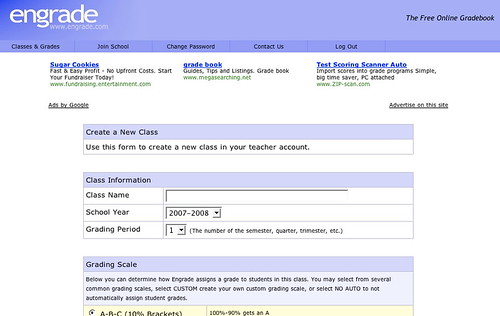
Engrade - http://www.engrade.com/ - is a wonderful teacher's tool. If you want to share marks with individual students privately online, and aren't on a Learning Management System like Desire2Learn, Moodle, or BlackBoard/WebCT, Engrade is just what you need. With Engrade you can post your students' marks, and they can use the password you assign individually to see their marks. Plus you can then download your class records into an Excel worksheet and save them there.
It's free and straightforward. You set up a class, add the students' names, and give them their own individual password, (I did that by email). When you've finished marking an assignment, you add the marks to Engrade and make them accessible.
I used it with my 3rd year university students last term and it worked just fine. They checked their marks, I got some emailed queries, but I simply answered those, and found it far smoother than discussions about marks in class. Some after-class conversations still happened, but most students were happy with the system - if not the marks ;->
The best thing was that they had adjusted to their marks before they got their assignment or assignment comments back, and, when they got them back, could focus more on my feedback and less on the mark.
Friday, January 12, 2007
SlideShare on Blogging
I've mentioned SlideShare, the YouTube for presentations, before - http://elgg.net/vinall/weblog/134207.html I like to browse it sometimes and just read what I find. Dr. Steven Warburton has put up an interesting set of slides on student blogging - http://lookleap.com/slideshare.net/a1 - I recommend it, and using the full screen mode.

I found it quite interesting, a bit different from mine.
I used an Elgg Community Blog which gave my students some control over how public, or not, their post was, set topics, often based on current readings, and required they write in it for a portion of their marks. Oral Rhetoric was classroom based, but the frequent writing paired with personal icons, either their photos or a chosen image, created a kind of threading in which we could, with a quick glance, see who the writer was.
The setting of weekly questions scaffolded the students in learning how to use a blog, which many, if not most, were uncomfortable with, especially using it for an educational purpose. As I believe they will sometimes be using blogs for professional purposes in their futures, I wanted them to begin to understand that there are different genres of blogs, and different rhetorical approaches - which I've explored here,
I wrote up my opinion of blogs used as part of a learning / teaching strategy - http://elgg.net/vinall/weblog/145563.html - I believe that that blogs can be used in many ways, and that they are especially important in creating learning communities.
technorati tags:edublogging, SlideShare
Blogged with Flock
Thursday, January 11, 2007
Switching Platforms? From Mac to Windows
Kathy Sierra, in a post in Creating Passionate Users links this video her daughter Skyler made about switching from a Mac to Windows. Enjoy!!!
http://www.wickedlysmart.com/skyler/SkylerSwticherQT2.mov
Courtesy of Donna Papacosta
http://www.wickedlysmart.com/skyler/SkylerSwticherQT2.mov
Courtesy of Donna Papacosta
Friday, December 29, 2006
What All Students (and Teachers) Should Know About Using the Web

In my Elgg blog, I'm reflecting on what I've learned this very busy past term. In it, I recommend the web basics every students (and therefore every teacher) should know.
http://elgg.net/vinall/weblog/145525.html
Tuesday, September 12, 2006
Temporarily Away

The view from my study.
I won't be posting in this blog until after Christmas, due to a heavy workload. I will, however, continue posting here - http://elgg.net/vinall/weblog - on, among other things, my experiences as I use wikis and blogs in place of a commercial Learning Management System. Hope you can link to me there.
Tuesday, September 05, 2006
Free Applications for Education
From the blog - AcademHack - http://academhack.outsidethetext.com/home/?p=51 - a list of tech tools for academics. The two I liked the looks of best are NeoOffice Aqua - a free suite of office tools for Macs (For Windows, there's OpenOffice, also free) and Google Apps for Education which is downloadable for free.
I hope some educational administrators take advantage of this time-limited offer.
With Google Apps for Education, you can offer all of your students innovative email, instant messaging, and calendaring, all for free.* You can select any combination of our available services (see below), and customize them with your school's logo, color scheme and content. You can manage your users through an easy web-based console or use our available APIs to integrate the services into your existing systems — and it's all hosted by Google, so there's no hardware or software for you to install or maintain. Find out more by reviewing detailed product information or attending an online seminar.

technorati tags:free, education, apps
Blogged with Flock
Thursday, August 31, 2006
VideoJug - How to do Just About Anything!
I was driving with the radio on, listening to CBC, and heard a description of a website called VideoJug that has short videos about how to do a wide variety of life necessities, and decided to check it out.

The videos I looked at are clear, short, easy to follow, and you can print up the instructions! Most are narrated with a lovely British accent, and the Aussie computer guys are funny.
Teachers might find it useful to show students how to give instructions clearly, and/or as a backup or reference to something they're teaching. they might also find the instructions useful personally ;->
If you have a blocked toilet, or want to know how to use make-up to give yourself smoky eyes, or how to floss your teeth, or how to make a martini, just go to VideoJug - http://www.videojug.com/
technorati tags:VideoJug, how_to, instructions
Blogged with Flock
Tuesday, August 22, 2006
Convergence Learning & Class Blogs
Via Will Richardson - http://weblogg-ed.com/2006/more-henry-jenkins/ - quoting Henry Jenkins
In talking media pedagogies, then, we should no longer imagine this as a process where adults teach and children learn. Rather, we should see it as increasingly a space where children teach one another and where, if they would open their eyes, adults could learn a great deal. (Emphasis mine.)
Weblogg-ed » More Henry Jenkins

I used to have a page tacked to my bulletin board with a quote from Elliot Eisner - from a Google search, this reference - Elliot Eisner (in Saks (Ed.), 1996, p. 412)
"Working at the edge of incompetence takes courage."
I thought this was true of all teaching, because we never know what our students don't know, and how they can actually 'get' what we want to transmit convey help them learn. I also thought it was true of all teaching because, especially in rhetoric or English lit., my areas, views and rules change.
I also thought it was what made my learning, (and theirs) exciting. When you are at the vygotskian point in your proximal development that you mostly know and can venture into interweaving your own experiences and ideas into what you are getting from the mentor/experts (teachers, books etc.), it is terrifically exciting. Things click, synapses connect, and you are in a wonderful state of flow!
As a teacher, I can sometimes feel the class in this state, and I work to keep that liveliness happening. As a student, I am very good at helping move the class (if the teacher allows it) into a space where this is possible.
Last term I used an Elgg class blog with a 3rd year undergrad course in oral rhetoric, which I've blogged about before - here, and here. I've had trouble writing up a "final report" on my experience for two reasons.
- I had my students use Elgg and I feel (I think the best description is) shy. (Paranoia - "If they look, they will find it, anywhere on the Web, but they know how much I like Elgg, so they'll know to look there." Well, yes, but it is only my opinion and they are welcome to differ. I guess this is a trace of the Staff Room effect where you can say what you want, get as extreme as you want because you won't be overheard. It's also a bit of a response to the "Rate Your Teacher" effect. Time to get over that.)
- The Henry Jenkins quotation at the beginning of this post. I feel some ownership of the class, but they own their success. In their blog posts I could see how they began to expose where they needed help, and I could see some of their classmates helping.
The best part for me, is how much I learned from watching them teach each other. Teaching and/or learning "at the edge of incompetence" is both exciting and valuable. And, with our rapidly changing and developing communication technologies, a necessity.
technorati tags:learning, class_blogs
Blogged with Flock
Saturday, August 19, 2006
Flock & Teaching/Learning
From Dave Tosh's Edufilter interview with Stephen Downes, Downes says -
If people can learn the concept of what they can do, they are better off learning the open access free tools, such as Flock, than other over-specialized and over-complex systems that have limited uses. IMHO.
In my mind, the browser is the LMS, and will continue to be the LMS. This is why I watch developments on the browser side, such as Flock, very closely.
(LMS = Learning Management System)

This fall I will be encouraging my students, as I have been encouraging my JNthWEB clients, to use Flock for their Web work. It is the Web 2.0 browser, aimed at the social user, perfect for a variety of communication tasks. In the screenshot above you can see
- both the icon for connecting to a Flickr or Photobucket account and how it can be displayed;
- the address bar's blue circle with an embedded white star which allows you to add a site to your Favorites, and if connected to a social bookmarking account, like my del.icio.us account, to that, all in one click; and
- The plume icon for the (WYSIWYG - see the Toolbar!) blogging tool and its window open and in use.
The other major aspect of Flock that I don't use but am recommending to my students and clients is its aggregation tool for blogs and news sites you want to follow easily and regularly (in the icon bar between the photo and blogging icons above). I will continue to use my Bloglines account (second from the left in the tabs under the photo stream) because I am used to it and like its set-up.
Oh, and of course, its Search Field on the upper right which searches a variety of search tools and lets you choose which one you want this time.
Flock has, as you can see, centralized a number of important Web communication aspects all within itself as a browser. For someone just beginning to learn how to use the Web, especially the social aspect of communicating using Web 2.0 tools, Flock is a great browser to introduce both the concepts and the tools.
The education is not in the tools, but rather, in the use of the tools
If people can learn the concept of what they can do, they are better off learning the open access free tools, such as Flock, than other over-specialized and over-complex systems that have limited uses. IMHO.
technorati tags:browsers, Flock, LMS
Blogged with Flock
Saturday, August 12, 2006
Elgg Interviewed!
Elgg - social network software for education:
An interview of the founders of Elgg
An interview of the founders of Elgg

I heartily recommend the Elgg Learning Landscape to any teacher and/or professor who wants to use blogs with their students. To learn more, you can click the link at the top to read an interview with Elgg's founders. Elgg itself is both free and very user-friendly. I recommend giving yourself some time to explore it. I also suggest that, if you decide to use it, you ask your students to explore it and see if any can find aspects that you've missed. I've learned a lot that way.
What makes Elgg particularly recommendable - (Is that a word? Oh, well, you know what I mean.) - is that the individual user can set their own level of privacy for each of their own postings. Students can set their post as "Private" and no one, not even the Community Owner/teacher will be able to see it. They can also set it for just the community, or just the logged-in users of Elgg, or make it completely "Public" - at their own discretion. I like that (except when some students don't understand "Private" and can be upset to get '0' on their post) and the students like it. I sometimes am shy when I think about certain people reading what I'm saying. Although many of the student generation are very (too?) casual about who might be their audience, there are some that appreciate the "walled garden" approach to posting their thoughts on the Web.
Last term I used an Elgg Community blog with a class, and it gave me a view of how the class was working that I'd never had before. I gave a combination of guidance on what to post on and the language etiquitte required, and the freedom of their own casual 'voices' plus the freedom to go beyond the topic guidelines. What I got to see was their thinking, including problems, and, delightfully, how they were helping each other both think and accomplish assignments. I believe the Community blog encouraged more of a community experience for the class members. They were also required to use a wiki (on Wikispaces) and post their assignments there, which gave them a larger (and consequently more 'real') audience than just the teacher!
I also use Elgg for a blog of my own where I explore the pedagogical implications of this new communication medium, Web 2.0.

I am part of a more loosely-joined community. Elgg is designed so that I can designate other Elgg members as "Friends". How I use that function is by clicking on "Friends Blogs" (see the menu bar in the image above under the forest and railway image) and I get to read an aggregated collection of the posts of the people I have designated as friends. Here's what part of my Network page looks like:

You can see, above, some of the people whose blogs I follow. It was through Dave Tosh's blog that I found the reference to the interview link that I started this post with.
And yesterday, I noticed the menu bar's "Friends of" link and discovered who was connecting to my Elgg blog! When I checked out their profiles, I could see that we had interests in common, and added many of them to my Friends list. Thus I'm gaining a loose community of people interested in ideas, and possibilities that we can share.
As you begin to think about the fall and your teaching, I recommend you check out the possibilites of Elgg for your class and for yourself.
technorati tags:Elgg, Class_Blogs, blogs
Blogged with Flock
Thursday, August 10, 2006
Following DOPA
If you want to keep track of what is happening in the States with DOPA, here are some links:
- from Wikipedia - http://en.wikipedia.org/wiki/Deleting_Online_Predators_Act
- from Technorati - http://www.technorati.com/tags/DOPA
- from Andy Carvin - http://www.andycarvin.com/dopa.html
technorati tags:DOPA, Jon_Stewart
Blogged with Flock
Monday, July 31, 2006
The U.S. DOPA Legislation
Damming the Ocean!
US House Resolution 5319, the Deleting Online Predators Act (DOPA), was passed by a 410 to 15 vote tonight. If the Resolution becomes law social networking sites and chat rooms must be blocked by schools and libraries or those institutions will lose their federal internet subsidies.
Techcrunch » Blog Archive » US House: Schools must block MySpace, many other sites
This American move could have a huge impact on Canada, and the world, and the Web, but I think they are simply trying to dam the ocean. It's too late. And it's totally ironic.
It's Too Late
Pandora's Box has been opened, the genie is out of the bottle, this new semiosis will not be stopped, as long as there's electricity, computers, and networks. If/When those are destroyed, we'll have more to worry about than MySpace!
It's Totally Ironic
Guess who created the ancestor of the Web? The American military during the Cold War, wanted a way to make sure they could keep controlling their fighting forces even if all major cities were wiped out, so they created ARPANET, and from ARAPANET came the Internet, followed by Tim Berners-Lee's development of a visual interface, and, thus, the World Wide Web, and, currently Web 2.0, the Read/Write or Social Web, where the fearful MySpace is located.
Net Neutrality and the American Internet Regulator
The video, with sound, will start to play after you click - almost 5 minutes - on YouTube and Jon Stewart - It's funny, but it's terrifying because the people making the rules appear to know so little.
Net neutrality, BTW, is a different issue than DOPA - it's the attempt of commercial interests to make the Web less democratic, to set up a two-tiered, or multi-tiered system where some sites would be less available than others depending on your service providers whims, or business deals. And this could affect Canada directly too, as Michael Geist has pointed out:
Websites, e-commerce companies, and other innovators have also relied on network neutrality, secure in the knowledge that the network treats all companies, whether big or small, equally. That approach enables those with the best products and services, not the deepest pockets, to emerge as the market winners.Internet users have similarly benefited from the network neutrality principle. They enjoy access to greater choice in goods, services, and content regardless of which ISP they use. While ISPs may compete based on price, service, or speed, they have not significantly differentiated their services based on availability of Internet content or applications, which remains the same for all.In short, network neutrality has enabled ISPs to invest heavily in new infrastructure, fostered greater competition and innovation, and provided all Canadians with equal access to a dizzying array of content.
Michael Geist - The Search for Net Neutrality
But I digress.
To Learn More About DOPA, go here -

and find this section and read the links
I’m not the best person to analyze this though. Here’s who I recommend:
- Declan McCullagh at ZDNet has posted a very thorough background article on DOPA.
- Andy Carvin writes Learning Now, a blog about education and technology for PBS, and has set up a page called DOPAWatch to aggregate blog posts on the topic.
- danah boyd is probably the web’s leading expert in analyzing the politics of MySpace and youth social networking.
- Will Richardson’s Weblogg-Ed is a great source for all things Learning 2.0
- Vicki A. Davis is a Christian school teacher in Georgia who uses blogs, wikis, podcasting and more in her classrooms. Vicki has written a number of powerful posts on DOPA
Techcrunch » Blog Archive » US House: Schools must block MySpace, many other sites
The most important communication development since the printing press, maybe even since the creation of writing, is being threatened! The most significant education tool is being blocked because some people misuse it. Why not ban cell-phones instead, because way more people misuse them!
What Is Needed
People of all ages need to learn how to use the Web safely and intelligently, because it isn't going to go away. The older and/or less Web-aware need to learn more about how it works and what it can do for them. The younger and supposedly Web-adept (but often strangely Web-naive) need to learn about b.s. detection (academically known as critical thinking) and privacy-protection. IMHO.
technorati tags:TechCrunch, DOPA, Net_Neutrality, Geist, Web
Blogged with Flock
Subscribe to:
Posts (Atom)

