Monday, April 16, 2007

Understanding the Net Generation's Academic Interests


The new tools that attract students to blogs and social networking software—including the resources that make possible site design, intertextuality, the combination of video and audio elements with text, the ability to comment and respond—can be used for the age-old project of developing the thinking, reading, and writing skills of students.

from MyLiteracies:
Understanding the Net Generation through LiveJournals and Literacy Practices
- http://innovateonline.info/index.php?view=article&id=384 by Dana J. Wilber

We have a radically new communication tool that uses text, images, sound, and moving images with sound, and can be made fully public, public in a limited way, or kept private. Many, probably most students, are rapidly teaching themselves elements of this new communication tool, and the academic world needs to - not just allow but - encourage the use of the web as a formal learning tool. Wilber's article explains what is happening with the Digital Generations' communication habits and patterns, and why faculty should be aware of and using these tools to help students learn.

I strongly recommend this short article.

Tuesday, April 10, 2007

Howard Gardner on the New Digital Media's Impact

http://spotlight.macfound.org/main/entry/medium_the_message - Link courtesy of Stephen Downes
Ever since I came across Gardner's theory of Multiple Intelligences, I've had enormous respect for his insights. Politics and Commerce are central, but education SHOULD be as deeply affected, as those because they both depend on appropriately educated citizens and workers.


Returning to the question at hand, two spheres that have been most immediately impacted by the new digital media are politics and commerce. Political candidates and operatives need to master the new media of communication, lest they become victims thereof; and any company or corporation that attempts to operate without employing the speed, flexibility, and advertising powers of the NDM is likely to have a short life. We can call these changes in human culture?more fundamental aspects of human cognition, emotion, and character are not significantly altered.

 powered by clipmarksblog it

Saturday, March 31, 2007

Mobile Learning: The Next Step in Technology-Mediated Learning

"Mobile Learning: The Next Step in Technology Mediated Learning" - http://tinyurl.com/3ckqlz - looks at both what learning is and how it might be changing as mobile devices become ever more common. The author of the article, Ellen Wagner, is the director of worldwide e-learning at Adobe Systems Inc. I recommend this brief but insightful article highly.

Courtesy of Stephen Downes - http://www.downes.ca/cgi-bin/page.cgi?post=39608 - I really like the quote he chose to highlight:
Learning is a deeply personal act, best facilitated by relevant, reliable and engaging experiences, yet many teaching approaches still rely on more impersonal 'command and control' models that include an instructor in charge, specific goals to be met and criteria to be mastered.

A comment that captures the complexity of education today.

For those who need a break from reading blogs - my Flickr account of being a tourist http://www.flickr.com/photos/shiftingsemiosis/sets/72157600030976263/
Reflection

Wednesday, March 21, 2007

The Web: Risks and Rescues

I believe that (most) technology is neutral; it's how people use it that makes it good or bad. It is curious that humans pay more attention to the relatively few predators than to the far larger problem of bullying, which is growing in our culture, not just online. Look at some of the most popular reality TV shows for examples.

Link courtesy of Stephen Downes - http://www.downes.ca/cgi-bin/page.cgi?post=39533,
From BlogSafety.com - http://www.blogsafety.com/thread.jspa?threadID=1100000263&tstart=0
Cyberbullies

Now let's look at a very different number deserving of parental attention: peer harassment, or cyberbullying. Compare the figure of 100 adult-to-minor predation cases in 2005 to 6.9 million "cases" of teen-to-teen cyberbullying. The latter number comes from a 2006 study by criminology Profs. J.W. Patchin and S. Hinduja which found that 33.4% of US teens have been victimized by cyberbullying (see "Bullies Move Beyond the Schoolyard"). According to Jupiter Research, there were 20.6 million US teens online by the end of last year. One third (33.4%) of 20.6 million suggests 6.9 million incidents of cyberbullying. These are the best figures we have on the noncriminal, peer-to-peer side of the social Web's risk spectrum, but are actually much better numbers (based on sound research methodology) than the 100 cases of sexual predation compiled from news media stories. The CACRC researchers tell me they're starting work on a study that will update and vastly improve on that 100-cases figure, but it won't be publicly available for over a year.


I find it interesting too, that I've never seen the positives of social networking highlighted before either:
[And consider one more notable number on the positive side of social networking: MySpace is the source of more than 100,000 visitors a year to the National Suicide Prevention Lifeline's Web site. It's the hotline's single biggest source of referrals... .]

So the web is neither good nor evil; it is simply a communication channel for humans.

Friday, March 02, 2007

Teaching and Learning

George Seimens says:
clipped from www.elearnspace.org
Innovation requires experimentation. When our schedules are too full for experimentation (a vital activity for helping teachers/educators understand the affordances of social software), we end up in a role of validating the existing structures of learning...rather than pushing boundaries of education for the benefit of learners.
 powered by clipmarks

I believe teachers should be actively learning the new media, as part of keeping our own sense of how challenging and difficult learning can be. We need to model how to take on the challenge of learning for our students,

Clipmarks Again

The first time I tried to clip the demo, I just got the image; see below.

This time I got to the demo on YouTube and was able to clip it there.

If I was successful, you will see it here, however, I will have to edit this post to add the tags.
clipped from www.youtube.com
powered by clipmarks

Sharing Accelerated - Clipmarks

Here's an interesting service I'm playing around with. I download it and now I'm clipping the demo and sending to my blog. Found through Scoble's blog on Clipmarks.

clipped from clipmarks.com
Watch the Clipmarks Demo
powered by clipmarks

Thursday, March 01, 2007

Learning on the Web

I find the web a wonderful place for learning. While learning on the web, I have discovered that I like to see and hear how to do things using the web, not just read about it. When I find a new application that I might be able to use, I look for the Tour or for a video and/or screencast. I start from seeing and hearing; I read howtos, tips and Help later, when I get stuck.

As a result, when I read, in my Bloglines, about Scoble's post about Ning having a new drag and drop set up for creating personal social networks, like Elgg, (my choice) MySpace or Facebook, I immediately watched the 12 minute video on Ning's new and easy functionality.


Now I have my own social network and travel site! And it took me about half an hour! http://whatwesaw.ning.com/

How do you best learn using the web?

Monday, February 26, 2007

We Live in Exponential Times

The rate of change in our world in exponential. Through Tony Karrer's blog, - a link to the video below:

Great music and a truly important message!

The Growing Impact of Web 2.0


Alja Sulčič describes the impact of web 2.0 on her daily activities, and suggests some questions arising from the changes the read/write web is bringing.

I'm really amazed at what big part Web 2.0 plays in my life (and I in its life). In just a few years it has entered our lives from different doors and it's growing stronger and more powerful days by day. And for this reason I agree with what Michael Wesch pointed out in his video - we really need to rethink a lot of things. Among these things I think that rethinking ourselves is one of the key points. We are being linked in previously unthinkable ways and our lives are being changed. What kind of changes is that bringing us? Are the changes improving our lives or crippling the social aspect of our analogue real lives as some fear?

The answers to these questions are many - and there should be. For me the most important changes are the feeling of connectedness, the feeling of responsibility, the need to share and the trust systems that the users of Web 2.0 are building among each other (just take for example Wikipedia). These are the changes I find most valuable and that I hope I (and others) will be able to keep and use not just for a better and more useful Web 2.0, but also to build a better future - together, by connecting are ideas and constructing new worlds.


If you want to understand more about how web 2.0 is affecting people, both young and old, I recommend the whole post - http://ialja.blogspot.com/2007/02/living-web-20.html - and the comments.

Image - "Open Clip Art Library/Clip Art." Open Clip Art Library. 24 Feb. 2007 .

Wednesday, February 21, 2007

eLearning Explained

If you aren't sure what eLearning is currently, and want to have a richer understanding, I recommend Tony Karrer's post on it - What is eLearning 2.0? - http://elearningtech.blogspot.com/2006/02/what-is-elearning-20.html

We are in the midst of the biggest change in communications since the printing press, and it is affecting both the methods of teaching/learning, and the content. We need to learn what we can, and use it when we can.

Monday, February 19, 2007

After the Crash: A Final Accounting

Well, my computer is as back to normal as I can get it. Some stuff was recovered, some was replaced, and some was lost forever.

What was Recovered
Many of my Word files were recovered, Not all; I keep discovering that something I know I had is missing. But, thanks to the service people at Canadian Computer on Speers in Oakville, I have much to be grateful for.
  • most of my applications were recovered, so I have the work set-up I'm used to.
  • many of my Word files were recovered but not the files from the course that I worked hardest on. I might be able to salvage some information from the histories of pages in the course wiki, but ...
  • my old poetry is gone and I only have some of it in hard copy.
  • and there's more that I will discover missing in the future, I suppose.


Some Replacements
  • I've downloaded QuickImage again, so I can easily turn my screenshots into jpegs for uploading to Flickr
  • I've downloaded Audacity and Lame so I can make MP3s
  • I'm going to get my podcasts set up in iTunes again


Lost Forever
  • my pictures. Some were in Flickr, but I use that mainly to provide images for my blogs. Many of my personal pictures are gone.
  • As I mentioned earlier, much of my older poetry is gone, and much of my carefully collected and built course materials are gone.
  • My Address Book and all my email files are gone


Lessons Learned
  • Backup, backup, backup!!!
  • At least for now, I'm forwarding all my email addresses to my gmail account, so I can store my addresses and the messages I save online.
  • Using online services, like del.icio.us for bookmarking and Bloglines for collecting blog urls, is not just social, it's a safety move. What I had online, I still have.


What I've Added
  • I now have a 120 GB hard drive, bigger than the one that crashed.
  • I now have a 640 MB RAM, much bigger than I used to have.


So I've learned a lot, more about the mechanics of computers, more about the wise use of my computer (did I mention you should backup your files?) and that my computer is my external brain, but that I can rebuild and repair it when accidents happen.

A Dark Note
I was going to add a photo of my computer that I had stored in Flickr, but Flickr appears to be closed down for now. Even online is not a complete safety net. Backup!

Wednesday, February 14, 2007

After the Crash!

Well the people who worked on my crashed Mac iBook G4 returned it to me with most of my programs on it, but with small things missing, like the Spell Checker in Word. Not really such a small thing, as I type quickly and need the backup. There were, however, no documents pictures or other data!

When I went into Finder and found everything empty, I couldn't believe it! I felt shaky. I started to enumerate all that I no longer had - pictures, and poetry, and saved pdf downloads, and all my documents from teaching materials to business records. I was not happy.

I called the people who had replaced my fried drive and I think I sounded quite pathetic as I begged them to see if there wasn't at least some data. They asked if I had back-ups; I confessed to being stupid. They said they'd try again, but it would take a long time. The other option was to send the fried drive to a lab and pay a couple of thousand dollars. I said I'd wait to see what they could do, and not to send it to the lab ('cause no way was I paying $2000.00, even if I had been really, really stupid.)

I ignored documents and data for a couple of days, just doing web work, and re-configuring what I needed to do that. Then, when I was looking for something else, I discovered a cache of backups from 2004. (I'm really bad with organizing material objects - I'm much better at organizing files, - and I will get in the habit of backing them up!)

So I took my 2004 CDs, which I hadn't made, but a technician had made them at the school where I worked when my assignment changed and I'd had to move from an IBM laptop to a Mac. (I wouldn't want you to think I used to be smart; someone else had done it for me.)

By that time, I was grateful to have anything. I dragged the files that were still useful over onto my new hard drive and began to put my external brain together again. And began to face the idea of re-creating work I had already done and lost. (Stupid! Stupid! Stooped!)

Today, I rewrote a consulting report on a website, and I think I actually improved it because I changed the structure and made it problem - suggested solution, problem - suggested solution rather than the more traditional business structure with all the recommendations at the end. This structure will be easier, I think, for the website owner to understand & implement.

Then - a reward for the virtues of acceptance and rewriting - the people with my fried drive called and said they got some of the document files off it. Tomorrow, I find out what has been returned to me. And I promise, promise, promise to back-up daily!

Monday, February 12, 2007

Getting Help with New Media Tools!

Through Stephen Downes and Mark Federman,
new media tools have always been difficult to learn without help!
Link here for an amusing illustration from YouTube

Wednesday, February 07, 2007

eLearning Technology: K-12 Blogging, Wiki and Social Bookmarking Resources

eLearning Technology: K-12 Blogging, Wiki and Social Bookmarking Resources
I suggest Wikispaces - http://www.wikispaces.com/ - which is free for K - 12, and can be made private so only (class) members can see it. It also has a (WYSIWYG) visual editor that is similar to a 'lite' word-processing application, and therefore very easy.

I also recommend Elgg Spaces - http://elggspaces.com/features.php - &/or Elgg.net - http://elgg.net/ - because blogging and friending and Community Blogs and lots of other wonderful social things are free there, plus it's an academic environment where each person can set their own privacy (or not) level. As well, I believe people (teachers) can set up free (private) group blogs in Blogger.

I recommend she explore my blog WebToolsforLearners - http://webtoolsforlearners.blogspot.com/index.html - where I post about useful, free tools for teachers and students.

Friday, February 02, 2007

When My Computer Crashed ...


When my computer crashed, I borrowed one. Those of my fellow web-addicts will still be cringing and crying out, "It's not the same!" And that's true. My own computer has all my files, plus an extensive collection of bookmarks on my Personal Toolbar, not to mention the mail application I'm used to.

So what am I doing writing a Blogger post? I'm writing to describe the backups I have, and the ones I will create when I get my computer back next week.

I write this blog for two kinds of readers, who may, in fact overlap. I write it for people learning how to use the web as part of their own personal learning, whether informal or education or job related. Second, I write this for teachers and students who want to use aspects of the web in their classrooms or for homework uses. (You can see the overlap!) So now the good news about what I am still able to (easily) do even on a borrowed computer.
  • I can write this post. I searched for my blog title using Google and found it at the top of the list. I knew my user name and password, so I could log in and write. The same is true for my other blogs. They are easy to find, and all I need is Google and my registration info. Which brings me to some bad news about where I store my registrations, which I'll get to later.
Breaking News
The phone just rang and I heard bad news from the computer repair guys. My hard drive is toast. Perhaps some of the data can be recovered, but I'll need a new drive or a new machine. ARGHH!!!!!!!

I love my Mac iBook. It was the first laptop I owned, and the fifth computer, and second platform, I wrote my thesis on. It was loaded with all kinds of nice programs, and I used many of them. It was beautiful in appearance and operation! I don't want to believe it's dead, but the repair guys have been helpful and money-saving before, so I trust them. Arghh;-(

Back to the good news and I'll get to the other bad news later.
  • I've put a lot of my work on the web. So most of my (important) pictures are on Flickr, and a few of my word files are on Box (but not enough - I've been negligent about back-up. That's the real bad news! I've been careless about backup and may have lost everything I haven't backed up, and that's a lot!) Sorry - back to the good news.
  • All my blogs are safely up on the web.
  • My wikis are safe on the web.
  • My big bookmark collection, in del.icio.us, is safe on the web.
  • My RSS collection is safe on the web, in Bloglines, - though I've been reading a lot of good things about Google Reader and thinking of transferring.
  • I can get to my two conventional email accounts by using webmail, which I find visually unattractive and operationally limited and slow, but hey! I can get my mail, and my Gmail, already on the web, is safely there.
  • And my most recent good move, which I thought I'd wasted time on and now find a lifesaver - I set up my own Google Account with my own personalized Google Homepage and filled it with widgets and links.
So my overall good news, is anything up on the web is safe and accessible.

My bad news is I have to get a new hard drive or laptop and I may have lost extensive data because I didn't back up.

My (unsolicited) advice: Backup, backup and backup! And put as much as you can up on the web for easy retrieval.

Thursday, January 18, 2007

Engrade - A Wonderful Teacher's Tool


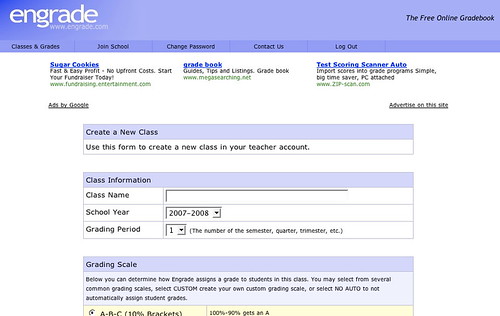
Engrade - http://www.engrade.com/ - is a wonderful teacher's tool. If you want to share marks with individual students privately online, and aren't on a Learning Management System like Desire2Learn, Moodle, or BlackBoard/WebCT, Engrade is just what you need. With Engrade you can post your students' marks, and they can use the password you assign individually to see their marks. Plus you can then download your class records into an Excel worksheet and save them there.

It's free and straightforward. You set up a class, add the students' names, and give them their own individual password, (I did that by email). When you've finished marking an assignment, you add the marks to Engrade and make them accessible.

I used it with my 3rd year university students last term and it worked just fine. They checked their marks, I got some emailed queries, but I simply answered those, and found it far smoother than discussions about marks in class. Some after-class conversations still happened, but most students were happy with the system - if not the marks ;->

The best thing was that they had adjusted to their marks before they got their assignment or assignment comments back, and, when they got them back, could focus more on my feedback and less on the mark.

Friday, January 12, 2007

SlideShare on Blogging

I've mentioned SlideShare, the YouTube for presentations, before - http://elgg.net/vinall/weblog/134207.html  I like to browse it sometimes  and just read what I find. Dr. Steven Warburton has put up an interesting set of slides on student blogging - http://lookleap.com/slideshare.net/a1 - I recommend it, and using the full screen mode.

I found it quite interesting, a bit different from mine.

I used an Elgg Community Blog which gave my students some control over how public, or not, their post was, set topics, often based on current readings, and required they write in it for a portion of their marks. Oral Rhetoric was classroom based, but the frequent writing paired with personal icons, either their photos or a chosen image, created a kind of threading in which we could, with a quick glance, see who the writer was.

The setting of weekly questions scaffolded the students in learning how to use a blog, which many, if not most, were uncomfortable with, especially using it for an educational purpose. As I believe they will sometimes be using blogs for professional purposes in their futures, I wanted them to begin to understand that there are different genres of blogs, and different rhetorical approaches - which I've explored here,

I wrote up my opinion of blogs used as part of a learning / teaching strategy - http://elgg.net/vinall/weblog/145563.html  - I believe that that blogs can be used in many ways, and that they are especially important in creating learning communities.

technorati tags:,

Blogged with Flock

Thursday, January 11, 2007

Switching Platforms? From Mac to Windows

Kathy Sierra, in a post in Creating Passionate Users links this video her daughter Skyler made about switching from a Mac to Windows. Enjoy!!!

http://www.wickedlysmart.com/skyler/SkylerSwticherQT2.mov

Courtesy of Donna Papacosta

Friday, December 29, 2006

What All Students (and Teachers) Should Know About Using the Web

www icon

In my Elgg blog, I'm reflecting on what I've learned this very busy past term. In it, I recommend the web basics every students (and therefore every teacher) should know.
http://elgg.net/vinall/weblog/145525.html